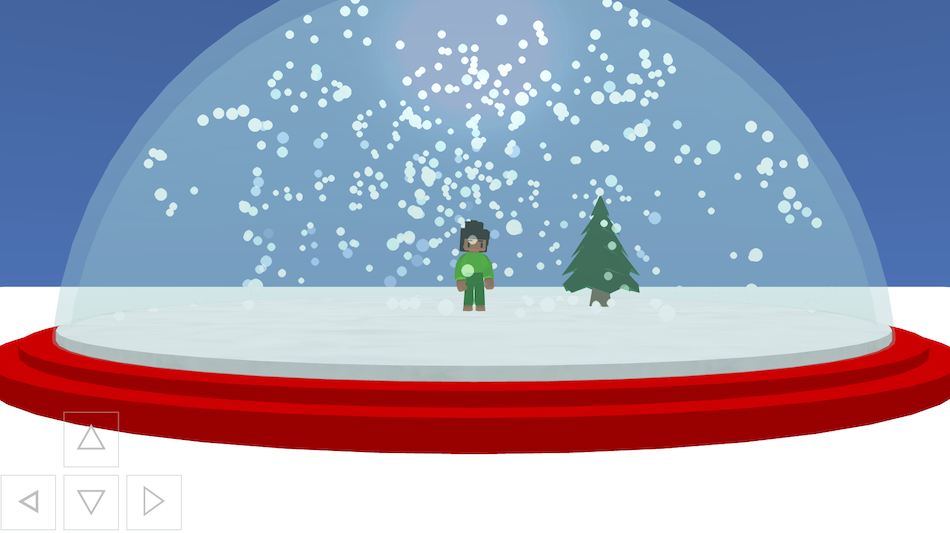
Snow Globe is a cosy seasonal scene where your playable character stand inside a giant glass snow globe while snow falls all around you. There’s a tree inside the globe, a colourful base, and on-screen messages that wish you “Season’s Greetings” and ask what you will put in your own snow globe.
This project demonstrates custom 3D shapes, transparency, subtracting meshes to make a hollow dome, particle effects for snow, a controllable character with animations, and camera follow.
Try it out
1. Open Flock XR and go to the Demo menu. 2. Select ❄️ Snow globe 3. Press Play. 4. Use W, A, S, D or the on-screen arrow buttons to move the character around inside the globe. 5. Look around the scene to see: – the glass dome of the snow globe – the decorated base – the tree inside – snow falling from above 6. Read the on-screen messages and think about what you might add to this globe.
Explore the code
Open the code and look for these parts:
Sky and ground A block sets the sky colour to a cool blue. A map is created with a white material to act as the ground or base area.
Building the globe Two spheres (sphere1 and sphere2) are created, one slightly smaller than the other. Their alpha (transparency) is set low so they look like glass. A subtract meshes block is used to subtract the inner sphere from the outer one. This makes a hollow dome, like a real glass snow globe.
Base of the globe Several cylinders form the layered base, using different diameters
Snow particle effects Particles are small, white, and fade out over time, giving the effect of falling snow.
Character and controls A character is added as the player. Physics is set to DYNAMIC so the player behaves like a physical object. Camera follow is turned on, looking at the player from the front. Canvas controls and button controls (ARROWS) are enabled. A forever block checks for FORWARD, BACKWARD, LEFT, RIGHT actions. It moves the player and switches between Walk and Idle animations.
Item inside the globe A tree model is added and coloured. It sits inside the globe as the main decoration.
Remix ideas
Try extending the project with your own ideas:
Change the text messages to match a different celebration or theme.
Add more items inside the globe: a house, non-playable characters, or a tiny village.
Change the snow colour, size, or speed to make flurries, blizzards, or gentle drifts.
Recolour the base to match your favourite colours.
Replace the tree with a completely different object.
Add music or sound effects to make it feel more magical.
Turn it into a mini game where you have to find hidden objects inside the globe.
A similar project you could create
Create your own “world in a bubble” scene: – Use spheres and transparency to make an underwater bubble, space dome, or glass capsule. – Add a character inside and use particle effects to make bubbles, fish, or ripples instead of snow.