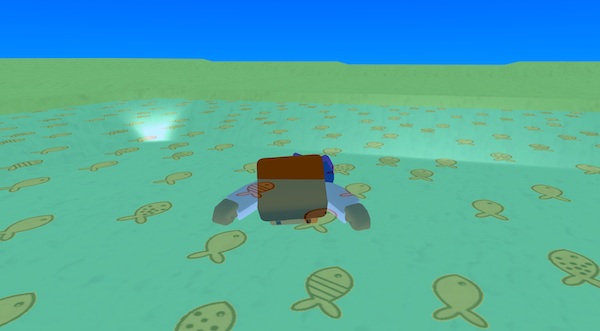
Water Map is a small scene that uses a circular depression map to create a basin, then places a semi-transparent “water” box over the centre with a fish texture. When the player enters the water the character switches to aswimming animation. When the player leaves the water, the flag turns off and the character returns to walking.
This project demonstrates using a map preset for terrain, using materials with transparency, and using collision enter/exit triggers to change player state and animations.
Try it out
1. Open Flock XR and go to the Demo menu. 2. Select 💧 Water map 3. Press Play. 4. Move forward/back to explore the terrain. 5. Walk into the water area in the centre. 6. You should see: – a basin-like terrain (depression) – a translucent “water” surface with a fish pattern – your character switching animation when entering water – the character switching back when you exit the water
Explore the code
Open the code and look for these parts:
Terrain map (heightmap preset) A create map block using circular_depression. This is what shapes the ground into a basin. A material block (rough texture set) that controls the look of the land (base colour + surface style).
Water layer (a big translucent box) A create box block sized to cover the centre area, using a fishes texture and ALPHA 0.3 so you can “see” it as water.
No physics on water An add physics → NONE block on the water, so it behaves like a trigger zone rather than a solid, pushable object.
Movement + animation switching A forever loop that handles forward/back movement and chooses animations. If swimming is true it uses Fly (an animation that looks like swimming); otherwise it uses Walk and Idle.
Entering / leaving the watercontrol Two collision blocks: – OnIntersectionEnterTrigger (player + water) → set swimming = true – OnIntersectionExitTrigger (player + water) → set swimming = false
Remix ideas
Try extending the project with your own ideas:
Add “splash” feedback: print text (“Splash!”), play a sound, or spawn particles on enter/exit water.
Change swim controls: when swimming, reduce speed (or increase it) to make water feel different from land.
Add multiple water zones (ponds/streams) and give each a different colour/texture.
Add floating objects on top of the water.
A similar project you could create
Create a biome with different liquid zones. – Change the colour, material, and transparency of the box to match the liquid – Make the movement match the liquid (for example: mud: slow and heavy, slime: bouncy, lava: quick) – Add text feedback – Use different animations