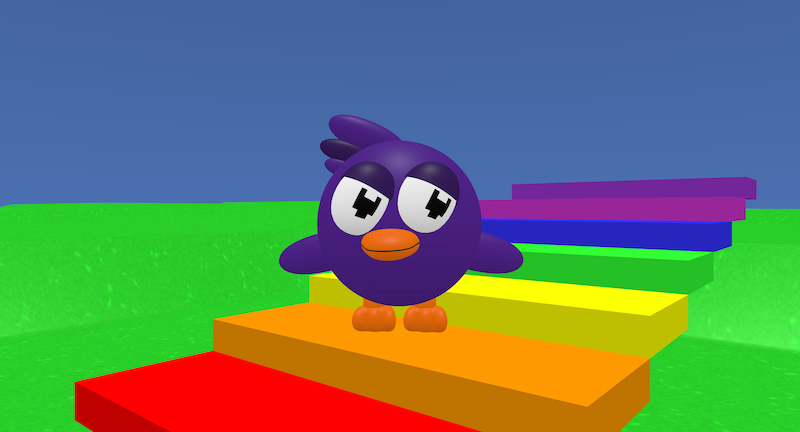
Flockenspiel is an interactive musical project where the player jumps onto coloured blocks to play musical notes.
Each block plays a different note when landed on, allowing the player to create melodies by moving up and down the blocks.
It shows how coding can be used to create interactive musical instruments inside a 3D world.
Try it out
1. Open Flock XR and go to the Demo menu. 2. Select 🎵 Flockenspiel 3. Press Play. 4. Use the controls: – Press W to move forward and S to move backward – Press A and D to move sideways – Press Space to jump 5. You should see: – Coloured blocks arranged in steps – A different musical note playing when you land on each block Try jumping between platforms to create your own tune!
Explore the code
Open the code and look for these parts:
Sky and map Blocks that set the sky colour and create a grassy map.
Movement Blocks that allow the character to more and jump with a camera that follows the character.
Lists for colours and notes Lists determine the colours used for the blocks and the notes that play.
A loop that creates steps The loop is used to automatically generates multiple musical blocks without manually placing each one.
Collision and sound A condition that checks if the player lands on a block then triggers a note to play.
Remix ideas
Try extending the project with your own ideas:
Change the notes to create a different scale.
Add more blocks to extend the instrument.
Arrange blocks in a circle instead of a line.
Make blocks light up when stepped on.
Change the colour theme of the blocks and the world.
Change the speed the player moves.
A similar project you could create
Create your own interactive instrument: – Build a drum pad where each pad plays a different sound. – Create a piano with a full range of notes. – Combine colour changes and sound effects for feedback.
This technique is used in music games, interactive art installations, and digital instruments to turn movement into sound.