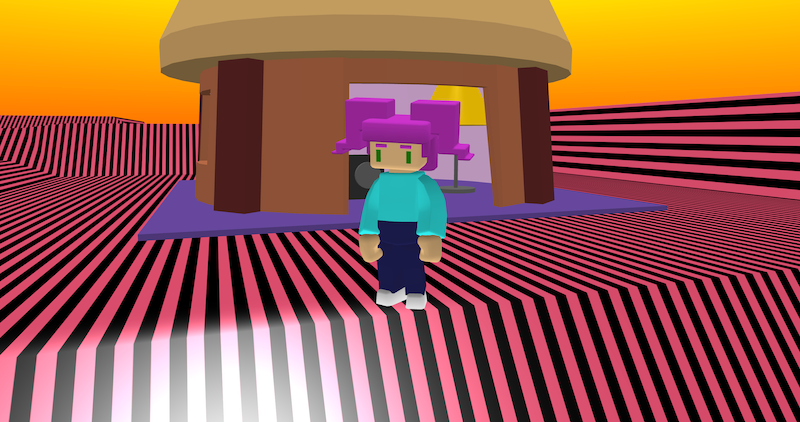
My Place is a small 3D world where you can explore a colourful home environment and experiment with spatial audio. A music box sits inside the house, and when you click it, the music plays from that location in the world rather than directly through the camera.
Try it out
1. Open Flock XR and go to the Demo menu. 2. Select 🏠 My place 3. Press Play. 4. Walk around and explore. Controls: – Hold left mouse button to look around – W = forward, S = backward – A = left, D = right 5. Click the music box to play music. 6. Walk near the lamp to see it glow.
Explore the code
Open the code and look for these parts:
Spatial audio music box One of the most interesting parts of the project is the music box: – a simple box and two speaker shapes are used to create a stereo system – clicking the music box starts a music track – the sound is attached to the music box’s position in the world – the music gets louder as you move closer and quieter as you move away This is called spatial audio and helps create a stronger sense of place inside a 3D environment.
The house A hut model is loaded into the world and customised: – multiple colours are applied to different parts of the building – the house is slightly reshaped using scaling – mesh physics are added so the player can walk inside.
Player movement and camera follow A character is loaded with physics enabled: – camera_follow is turned on – movement uses forward, backward, and sideways controls – walking animations play while moving – idle animations play when standing still
Lamp materials A lamp is created from cylinders: – base – stand – lampshade When the player moves close to the lamp: – the lampshade glows When the player walks away: – the glow effect is removed
On-screen instructions Several text messages appear when the project starts: – movement controls – camera controls – hints about interacting with objects
Remix ideas
Try extending the project with your own ideas:
Add trees, flowers, or garden decorations
Create multiple music boxes with different songs
Change the look of the music box
Add a bird that chirps when you are near
Change the colours and materials in the world
Use glow effects on other objects
A similar project you could create
Create a City soundscape – Create a city with buildings, vehicles, and characters – Add sounds the play from each object – Add glow effects to materials