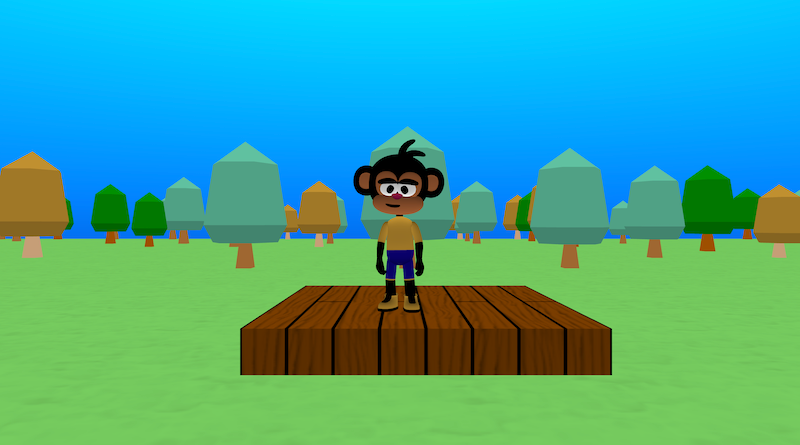
Forest Base is a ready-made 3D forest world with a small platform and a character you can move around. It gives you a “base world” you can reuse: a grassy ground, a clearing in the middle, and lots of trees scattered around in different sizes and colours.
This project demonstrates:
A forest created using a seed pattern to place the trees.
A third-person character you can move and jump with.
A camera that follows the player.
Try it out
1. Open Flock XR and go to the Demo menu. 2. Select 🌲 Forest Base 3. Press Play. 4. Hold left mouse button and move the mouse to look around. 5. Press W to move forward, S – move backward, and Space to jump 6. Notice how the trees are different sizes and colours and there’s a clearer space in the middle where your player starts.
Explore the code
Open the code and look for these parts:
Ground and starting platform The sky colour is set to a light blue. A map with a green material is created as the main ground. A box is created as a small wooden platform at the centre:
Player and camera In a separate start block: The camera object is stored in a camera variable, and left/right controls rotate this camera. A character is loaded at the world centre. The character is given DYNAMIC physics so they move and jump realistically. A camera follow block makes the camera follow behind the player.
Third-person player controls and animations In the forever loop: If FORWARD is pressed: The player plays the Walk animation. The player moves forward. If BACKWARD is pressed: The player plays Walk and moves backward. If LEFT or RIGHT is pressed: Instead of sliding, the camera rotates left or right around the player. If no keys are pressed: The player switches back to the Idle animation.
On-screen instructions Another start block shows text messages printed on the canvas. These messages appear for a short time to remind players of the controls.
The “forest” The forest custom block has one input: seed. It uses two nested loops (i and j) to step across a grid: From -48 to 48 in steps of 6 in X and Z. It skips the centre area so there’s a clear starting space: Only places trees where abs(i) or abs(j) is greater than a certain amount. For each grid position: It uses random_seeded_int to decide: whether to place a tree which tree type, and the tree size. It then loads a tree model at that (i, j) position with: Different leaf and trunk colours depending on the chosen type. Because the random numbers are seeded, the forest layout is repeatable: the same seed gives the same forest every time.
Remix ideas
Try extending the project with your own ideas:
Change the forest style Edit the tree colours to make: – Autumn trees (oranges, reds, yellows). – Spooky dark forest. – Candy-coloured fantasy woods.
Play with the seed Change the seed value in the call to forest to get a new forest pattern. Try different seeds and see how the layout changes.
Addstructures Add cabins, tents, campfires, bridges, or rivers inside the forest.
A similar project you could create
Create your own “Biome Explorer” project. Use a similar grid + seeded random system to generate: – A desert with rocks – A sea with boats – A meadow with flowers
Reuse the same player controller and camera follow, but swap out the models and colours.