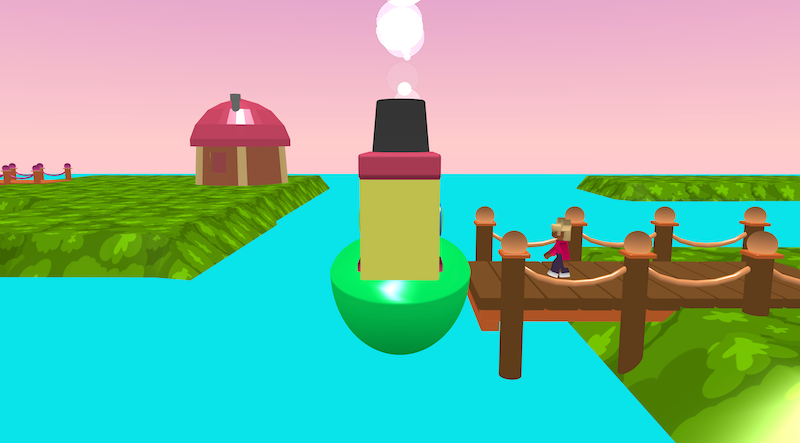
Boat Trip is a small travel mission where a passenger boards your boat, you steer across the water, avoid crashing, and take them home.
Try it out
1. Open Flock XR and go to the Demo menu. 2. Select ⛵ Boat trip 3. Press Play 4. Press Space to board 5. Use WASD to steer the boat and drag the mouse to look around 6. Navigate to the passengers home 7. Watch the celebration effects when the passenger gets home safely
Explore the code
Open the code and look for these parts:
Sky and ground A block sets the sky colour to a list of colours. A map is created with a green material that looks like grass. A large box is used to create sea that covers the deeper parts of the map
The playable boat A boat is added with dynamic physics The camera follows the boat A cylinder called chimney follows the boat, a particle effect from the cylinder adds smoke A forever loop checks to see if the boat is not touching the sea, it it doesn’t touch the sea the boat respawns at the start
Waiting character A character stands in idle pose until the space button is pressed When space is pressed the character moves to the boat in a walking animation Once aboard the character is attached to the boat The character waits until near their home jetty then glides to the house The character says thank you and waves
Balloon particle effects A house is added at the start When the character arrives home a balloon particle effect is triggered above the house
Remix ideas
Try extending the project with your own ideas:
Add more houses and jettys that are decoys
Pick up more passengers along the way
Add rocks and trees to hide the house
Change the speed of the boat to make it easier or harder
Add checkpoints or coins in the water.
Add sea creatures or floating obstacles.
Change the ending celebration effect.
A similar project you could create
Create your own “Alien adventure” game: – Control a plane to take an alien back to their planet. – Use spheres, materials and effects to make multiple planets.