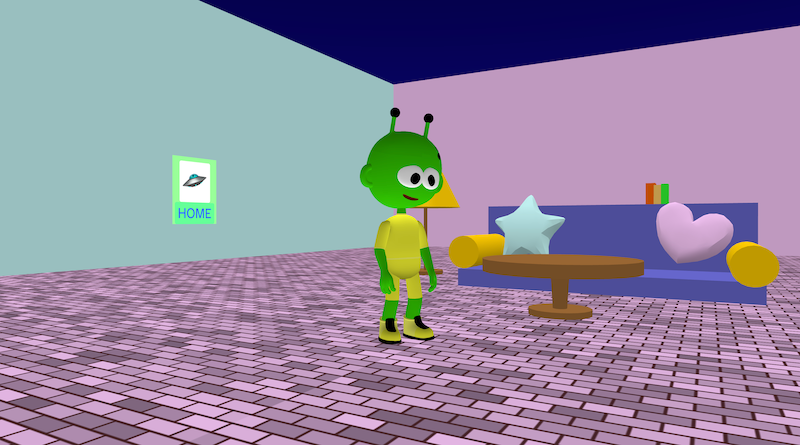
Roominator is a mini 3D “room” you can walk around in. It’s built from simple shapes (boxes, cylinders, planes) plus a few fun 3D objects (like a heart and star). You control a character tom ove round the room in third-person view.
This project is a great example of how to combine world-building and game controls.
Try it out
1. Open Flock XR and go to the Demo menu. 2. Select 🛋️ Roominator 3. Press Play. 4. Controls: – Hold left mouse button to look around – W = forward, S = backward – Space = jump
Explore the code
Open the code and look for these parts:
Build the room (floor + walls) The room is made from a few big boxes: – floor: a large thin box – walls: three big boxes placed around the floor – the floor material is set to bricks
Poster / sign A plane is created and rotated to face into the room. Then several say blocks are stacked on it to create a “poster”: – a big emoji (🛸) – the word “HOME” – a blank line to space things nicely This is basically a DIY UI screen inside your 3D world.
Furniture (sofa, shelf + books, lamp, table) Each piece of furniture is just shapes arranged carefully: – sofa: back + base + two cylinder arms – shelf: a board + three “books” (little boxes) with different colours – lamp: base + stand + shade (cylinder stack) – table: top + base + stand
Player movement + camera follow A character is loaded with physics is set to Dynamic, then: – camera_follow is enabled with a radius of 7 – movement uses forward, back and sideways – animations are used to show natural movement So you get a third-person “game feel”.
Remix ideas
Try extending the project with your own ideas:
Change the poster text and emoji
Add a rug (plane with a different material)
Add a second room and make a hallway between them
Change movement speed
Add a door that opens when you touch it
Add more furniture
A similar project you could create
Make a Build-Your-Own Dorm / Classroom / Garden: – build the room from shapes and objects – decorate it with posters, paintings, or signs – add one interactive rule (glow / hide / open door) That’s basically the same structure as Roominator — just with your own theme and rules.