
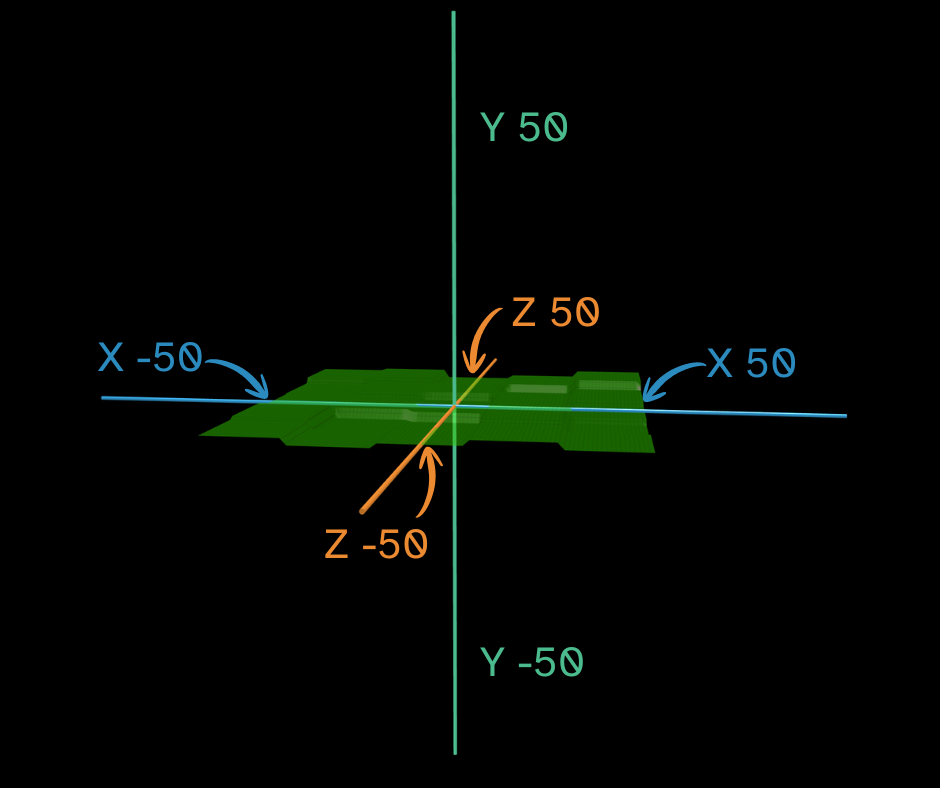
Flock XR worlds are 3D spaces. This means objects can be placed left and right, up and down, and forwards and backwards.
To position objects in a Flock XR world, you use three numbers:
X, Y and Z
These are called coordinates. They tell Flock XR exactly where something should appear in the 3D world.
What does X, Y and Z mean?
In Flock XR:
X controls left and right
Y controls up and down
Z controls forwards and backwards
You can think of them like this:
X = left and right
Y = up and down
Z = forwards and backwards
So, if you want to move an object sideways, you change its X value.
If you want to move it higher or lower, you change its Y value.
If you want to move it forwards or backwards in the world, you change its Z value.
Where is the centre of a Flock XR world?
The centre of a Flock XR world is:
0, 0, 0
This means:
X = 0
Y = 0
Z = 0
This point is called the origin. It is the middle of the 3D world.
When an object is placed at 0, 0, 0, it is in the centre of the world.
How big is a Flock XR world?
A Flock XR world is:
100 x 100 x 100
This means the world has space across its width, height and depth.
The centre is 0, 0, 0, so the world stretches out from the middle in different directions.
In simple terms:
- X moves across the world
- Y moves up and down
- Z moves forwards and backwards
Understanding X
The X coordinate moves an object from side to side.
If you change the X number, the object moves left or right.
For example:
0, 0, 0
places an object in the centre of the world.
With the camera in the default position:
10, 0, 0
moves the object to the right of centre.
-10, 0, 0
moves the object to the left of centre.
Positive and negative numbers move the object in opposite directions.
Understanding Y
The Y coordinate moves an object up and down.
If you increase the Y number, the object moves higher.
For example:
0, 0, 0
places an object at the centre height.
0, 10, 0
moves the object upwards.
0, -10, 0
moves the object downwards.
Y is useful when you want to place objects above the ground, stack objects, make things float or create tall structures.
Understanding Z
The Z coordinate moves an object forwards and backwards.
If you change the Z number, the object moves deeper into the world or closer towards the front.
For example:
0, 0, 0
places an object in the centre of the world.
With the camera in the default position:
0, 0, 10
moves the object in backwards in the world.
0, 0, -10
moves the object forwards in the world.
Z is useful when you want to place objects along a path, create distance between objects or build a world that the player can move through.
Reading coordinates in Flock XR
Coordinates are usually written in this order:
X, Y, Z
So this coordinate:
15, 5, -20
means:
X = 15
Y = 5
Z = -20
The object has moved sideways, upwards and backwards or forwards from the centre.
A good way to read coordinates is:
Left/right, up/down, forwards/backwards
Why do coordinates matter?
Coordinates help you control where things appear in your world.
You can use X, Y and Z to:
- place characters
- build scenes
- create paths
- position buildings
- move objects
- design games
- create journeys
- build interactive 3D worlds
Once you understand X, Y and Z, you can plan your world more carefully and make your projects easier for other people to explore.
Try it yourself
Add an object to your Flock XR world and try changing one number at a time.
First, change only the X value. What happens?
Then, change only the Y value. What happens?
Then, change only the Z value. What happens?
Changing one number at a time is the best way to learn how coordinates work.
Quick reminder
X = left and right
Y = up and down
Z = forwards and backwards
0, 0, 0 = the centre of the world
A Flock XR world = 100 x 100 x 100
When you build in Flock XR, you are not just placing objects on a flat screen. You are designing a 3D space that people can move through, explore and experience.