
You can use keyboard controls in Flock XR to open files and save or export your work.
This is useful when you want to keep your project safe, carry on working later, or share your project with someone else.
Open a file with keyboard controls
If you already have a Flock XR project file on your computer you can open it in Flock XR using the open file shortcut:
| Device | Shortcut |
|---|---|
| Windows | Ctrl + O |
| Mac | |
This opens your operating system file manager so you can choose a project to open.
Save or export your work with keyboard controls
To save your current project, use the save shortcut:
| Device | Shortcut |
|---|---|
| Windows | Ctrl + S |
| Mac | |
Use this shortcut often while you are working. Saving your project helps protect your work if you close the browser, refresh the page, or move to a different activity.
Open the main menu first
You can also open the main (burger) menu and choose file options from there.
| Device | Shortcut |
|---|---|
| Windows | Ctrl + M |
| Mac | |
The main menu is also useful for adjusting interface settings such as language or theme.
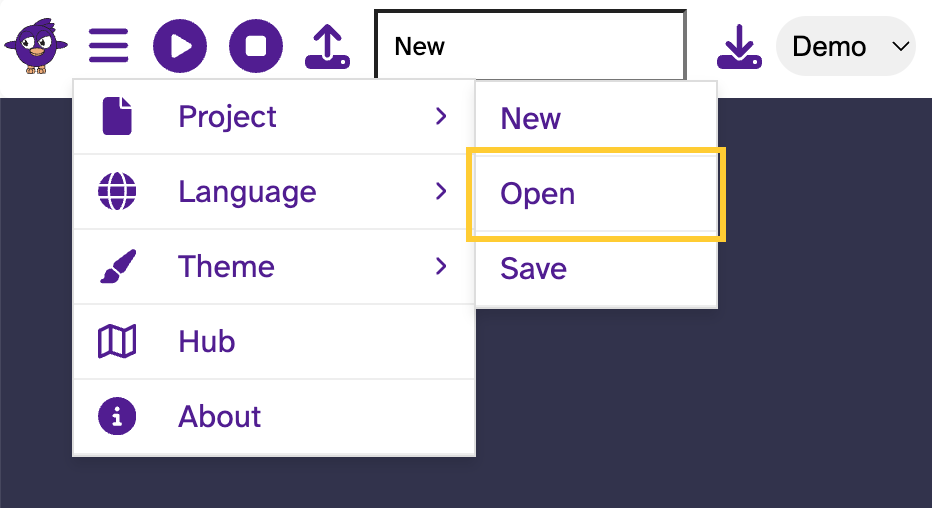
Quick steps
- To open a file, press
Ctrl + Oon Windows orCmd⌘ - To save or export your work, press
Ctrl + Son Windows orCmd⌘ - To open the main menu, press
Ctrl + Mon Windows orCmd⌘ - Save your work often, especially before closing Flock XR.
Troubleshooting
The open file shortcut did not work
Make sure you are pressing the correct shortcut for your device:
- On Windows, press
Ctrl + O. - On Mac, press
Cmd⌘
If nothing happens, press Esc and try the shortcut again.
I am not sure if my work is saved
Use the save or export shortcut again:
| Device | Shortcut |
|---|---|
| Windows | Ctrl + S |
| Mac | |
It is a good habit to save before you close Flock XR, refresh the page, or start a new part of your project.
Related articles
👉 Keyboard controls in Flock XR main page
👉 How to use the keyboard controls menu in Flock XR
👉 How to use keyboard controls to navigate the Flock XR interface
👉 How to use keyboard controls for the Flock XR main menu
👉 How to use keyboard controls to create an animated character in Flock XR