
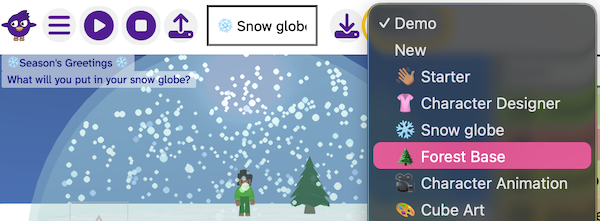
Flock XR includes a collection of Example Projects that you can open from the Demo menu. These projects use a wide range of Flock XR blocks and show the different kinds of 3D games, animations, and experiences you can create.
You can play them, explore how they work, edit the code, and then save your own remixed version.
How to open an example project
- Open Flock XR.
- Select the Demo menu from the top bar.
- Choose an example project from the list.
- The project loads, ready to explore.
Each example is designed to highlight different features, ideas, and blocks.
What you can do with example projects
Play or interact with the project
See what happens when you interact with a project, understand how the characters move, and where audio is coming from. This is a great way to get ideas for your own creations.
Edit the code and see your changes
You can edit the blocks to change how the project works.
For example, you can:
- change movement speed
- add materials and update colours
- switch characters
- update sounds or effects
Once you make a change, you can press play to test it instantly.
Save your own version
If you want to keep your remix, you can save your edited version to use again later.
This makes example projects a great starting point for new ideas.
See: Save your Flock XR project
Why remixing is a good place to start
- You avoid starting from a blank world
- You get a great place to experiment
- You discover new blocks and effects
- You build confidence as a creator
Remixing is one of the fastest ways to understand how Flock XR works.